> ## Documentation Index
> Fetch the complete documentation index at: https://docs.hipocap.com/llms.txt
> Use this file to discover all available pages before exploring further.
# Getting Started
**Hipocap Shield currently supports Python only.** The Hipocap Shield integrates with Laminar for observability, which supports both Python and TypeScript. However, the security analysis features (Shield) are only available in Python.
## Quick Start Guide
### Step 1: Install Hipocap
Install the Hipocap Python package:
```bash theme={null}
pip install hipocap
```
Or with your package manager:
```bash theme={null}
# Poetry
poetry add hipocap
# uv
uv add hipocap
# pip with requirements.txt
echo "hipocap" >> requirements.txt
pip install -r requirements.txt
```
### Step 2: Get Your API Keys
You'll need API keys for Hipocap:
1. **Hipocap API Key** (`HIPOCAP_API_KEY`): For security analysis and observability
* [Book a demo](https://hipocap.com/contact) to get access to Hipocap Cloud, or
* Use your self-hosted instance (see [Hosting Options](/hosting-options))
* Get this from your Hipocap project settings
2. **Hipocap User ID** (`HIPOCAP_USER_ID`): For user context and RBAC
* Get this from your Hipocap project settings
* Used for role-based access control
### Step 3: Initialize Hipocap
Add initialization code at the start of your application (before any LLM calls):
```python theme={null}
from hipocap import Hipocap
import os
# Read environment variables
HIPOCAP_SERVER_URL = os.environ.get("HIPOCAP_SERVER_URL", "http://localhost:8006")
HIPOCAP_API_KEY = os.environ.get("HIPOCAP_API_KEY")
HIPOCAP_USER_ID = os.environ.get("HIPOCAP_USER_ID")
OBS_BASE_URL = os.environ.get("HIPOCAP_OBS_BASE_URL", "http://localhost")
OBS_HTTP_PORT = int(os.environ.get("HIPOCAP_OBS_HTTP_PORT", "8000"))
OBS_GRPC_PORT = int(os.environ.get("HIPOCAP_OBS_GRPC_PORT", "8001"))
# Initialize Hipocap (returns the observability client)
observ_client = Hipocap.initialize(
project_api_key=HIPOCAP_API_KEY,
base_url=OBS_BASE_URL,
http_port=OBS_HTTP_PORT,
grpc_port=OBS_GRPC_PORT,
hipocap_base_url=HIPOCAP_SERVER_URL,
hipocap_timeout=60,
hipocap_user_id=HIPOCAP_USER_ID,
)
```
**For Hipocap Cloud:**
```python theme={null}
observ_client = Hipocap.initialize(
project_api_key=os.environ.get("HIPOCAP_API_KEY"),
base_url=os.environ.get("HIPOCAP_OBS_BASE_URL", "https://api.hipocap.ai"),
http_port=int(os.environ.get("HIPOCAP_OBS_HTTP_PORT", "8000")),
grpc_port=int(os.environ.get("HIPOCAP_OBS_GRPC_PORT", "8001")),
hipocap_base_url=os.environ.get("HIPOCAP_SERVER_URL", "https://api.hipocap.ai"),
hipocap_timeout=60,
hipocap_user_id=os.environ.get("HIPOCAP_USER_ID"),
)
```
### Step 4: Add Tracing to Your Functions
Use the `@observe()` decorator to trace your functions:
```python theme={null}
from hipocap import observe
@observe()
def my_function(user_input: str):
# Your function logic here
return result
```
### Step 5: Add Security Analysis
Protect sensitive function calls with Hipocap Shield:
```python theme={null}
from hipocap import Hipocap, observe
# Initialize and get the observability client
observ_client = Hipocap.initialize(
project_api_key=os.environ.get("HIPOCAP_API_KEY"),
# ... other config ...
)
@observe()
def send_email(to: str, subject: str, body: str):
# Execute the function first
result_data = {"status": "sent", "to": to, "subject": subject}
# Analyze the result after execution
if observ_client:
analysis_result = observ_client.analyze(
function_name="send_email",
function_result=result_data, # Actual function result
function_args={"to": to, "subject": subject, "body": body},
user_query="User wants to send an email",
user_role="user", # User's role for RBAC
input_analysis=True, # Stage 1: Input analysis
llm_analysis=True, # Stage 2: LLM analysis
quarantine_analysis=False, # Stage 3: Quarantine (optional)
)
# Check if safe to use
if not analysis_result.get("safe_to_use"):
# Blocked due to security threat
print(f"Blocked: {analysis_result.get('reason')}")
return {"status": "blocked", "reason": analysis_result.get("reason")}
# Safe to return the result
print(f"Email sent to {to}")
return result_data
```
## Complete Example
Here's a complete working example:
```python theme={null}
import os
import json
from openai import OpenAI
from hipocap import Hipocap, observe
# Initialize Hipocap
HIPOCAP_SERVER_URL = os.environ.get("HIPOCAP_SERVER_URL", "http://localhost:8006")
HIPOCAP_API_KEY = os.environ.get("HIPOCAP_API_KEY")
HIPOCAP_USER_ID = os.environ.get("HIPOCAP_USER_ID")
OBS_BASE_URL = os.environ.get("HIPOCAP_OBS_BASE_URL", "http://localhost")
OBS_HTTP_PORT = int(os.environ.get("HIPOCAP_OBS_HTTP_PORT", "8000"))
OBS_GRPC_PORT = int(os.environ.get("HIPOCAP_OBS_GRPC_PORT", "8001"))
# Initialize Hipocap (returns observability client)
observ_client = Hipocap.initialize(
project_api_key=HIPOCAP_API_KEY,
base_url=OBS_BASE_URL,
http_port=OBS_HTTP_PORT,
grpc_port=OBS_GRPC_PORT,
hipocap_base_url=HIPOCAP_SERVER_URL,
hipocap_timeout=60,
hipocap_user_id=HIPOCAP_USER_ID,
)
# Initialize your LLM client
llm_client = OpenAI(api_key=os.environ.get("OPENAI_API_KEY"))
@observe()
def get_user_data(user_id: str):
"""Retrieve user data - this will be traced automatically."""
# Simulate data retrieval
return {"user_id": user_id, "email": f"user{user_id}@example.com"}
@observe()
def process_user_request(user_query: str, user_id: str):
"""Process a user request with security analysis."""
# Get user data
user_data = get_user_data(user_id)
# Analyze the result after getting data
if observ_client:
analysis_result = observ_client.analyze(
function_name="get_user_data",
function_result=user_data, # Actual function result
function_args={"user_id": user_id},
user_query=user_query,
user_role="user",
input_analysis=True,
llm_analysis=True,
)
if not analysis_result.get("safe_to_use"):
return {"error": "Request blocked", "reason": analysis_result.get("reason")}
# Call LLM (automatically traced)
response = llm_client.chat.completions.create(
model="gpt-4",
messages=[{"role": "user", "content": user_query}]
)
return {"response": response.choices[0].message.content}
# Run your application
if __name__ == "__main__":
result = process_user_request("What's my email?", "user123")
print(result)
```
## What Happens Next?
1. **Traces are captured**: All LLM calls and `@observe()` functions are automatically traced
2. **Security analysis runs**: Function calls are analyzed for threats (if enabled)
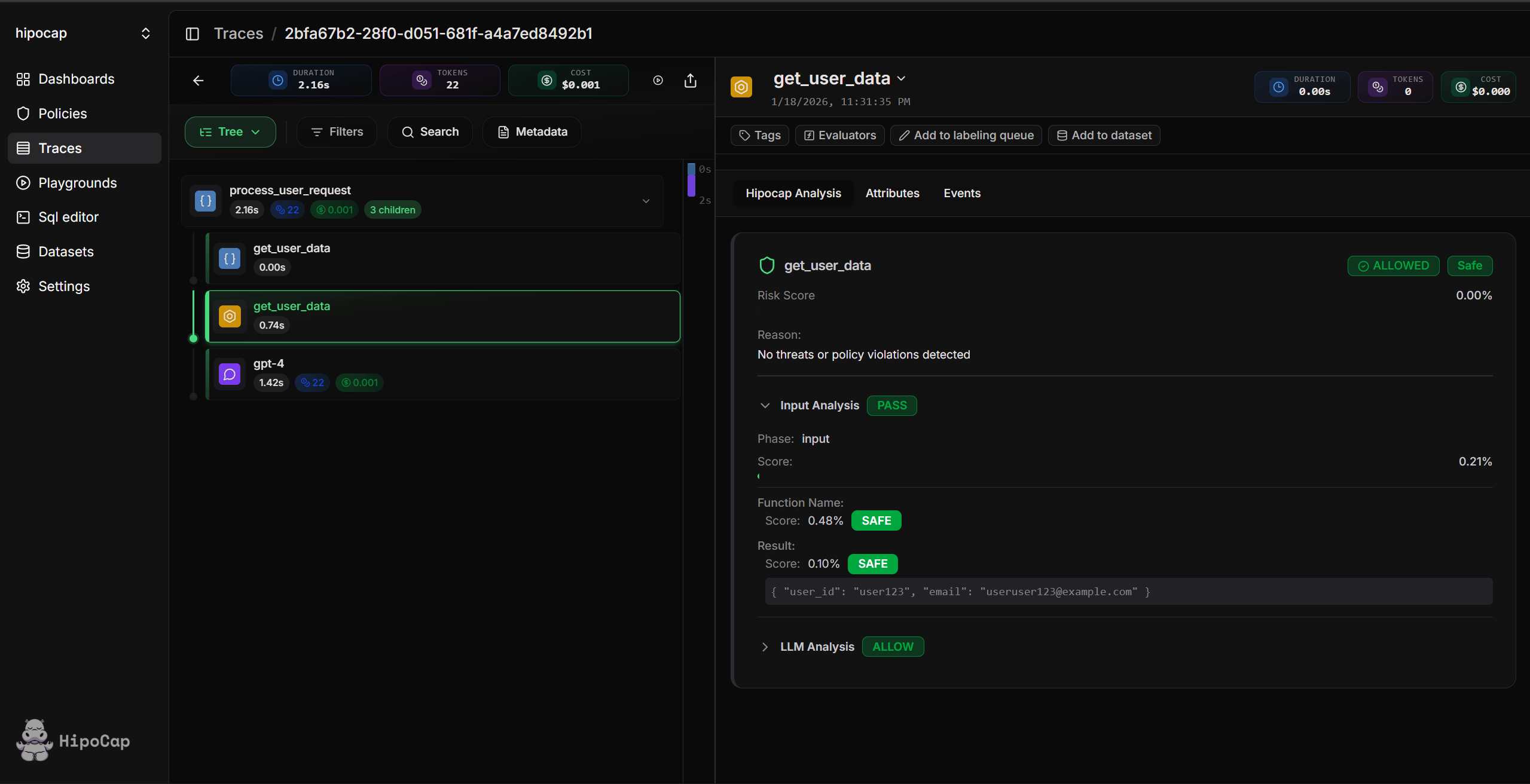
3. **View in dashboard**: Open your Hipocap dashboard to see traces and security events
## Next Steps
Learn how to trace LLM calls, tool executions, and custom functions.
Set up the Hipocap Shield to protect against prompt injection and sensitive keyword exposure.
Configure role-based access control and function-level permissions.
Choose between Hipocap Cloud and self-hosting.
export const LAMINAR_INSTRUMENTATION_PROMPT = `
You are a senior observability engineer for LLM/agent systems, specializing in Laminar (traces, spans, datasets, evaluations). Your job: propose and (if asked) implement best-practice Laminar instrumentation for my system so production runs become high-quality, analyzable traces.
## Ground rules
- Do not guess Laminar APIs. If you are unsure, ask a question or tell me what you need to confirm.
- Keep changes minimal and aligned with the existing repo style (avoid refactors unless necessary).
- Prefer stable, low-cardinality names and tags. Put high-cardinality values (request IDs, user IDs, document IDs) into metadata/attributes, not span names or tags.
- Reader Mode is intentionally high-signal: it focuses on LLM and TOOL spans. Ensure the key work in the system is represented with LLM/TOOL spans (or clearly parented under them) so traces are easy to scan.
## How Laminar thinks (mental model)
- One trace = one request/turn/job/pipeline run (a single unit of work you want to analyze end-to-end).
- A trace is a tree of spans (units of work). Spans can be typed (LLM, TOOL, DEFAULT, EXECUTOR, etc.) to drive UI behavior and analysis.
- Auto-instrumentation can capture common LLM and tool libraries, but we still need first-party spans around our orchestration/business logic so traces are understandable.
- Great traces have:
- A single clear root span per trace boundary
- A small number of meaningful child spans for major steps (routing, retrieval, tool execution, post-processing, evaluation)
- Consistent naming (stable across runs)
- Context for filtering/analysis: userId, sessionId, metadata, tags
- Privacy controls: sensitive inputs/outputs are not recorded
## Inputs I will provide (ask for anything missing)
- Language/runtime: Python (Hipocap Shield is Python-only)
- Framework/entrypoints: HTTP server, workers, cron, CLI, streaming, serverless, data pipeline scheduler, etc.
- LLM provider(s) and how calls are made (OpenAI SDK, Anthropic SDK, LangChain/LlamaIndex, custom HTTP, etc.)
- A short architecture sketch: main flows, queue boundaries, background jobs, tool interfaces
- Data sensitivity: what MUST NOT be recorded (sensitive keywords, secrets, prompts, attachments, customer data, etc.)
- The repo/code for key files (or a focused excerpt) and constraints (minimal diffs, no new deps, etc.)
## Installation and setup expectations (for coding agents like Claude/Codex)
- First, determine the repo's package manager and use it (don't invent a new one):
- Python: if pyproject.toml uses Poetry -> 'poetry add hipocap'; if uv.lock -> 'uv add hipocap'; if requirements.txt -> add 'hipocap' then install; otherwise ask what dependency manager is used.
- If Python auto-instrumentation is missing provider spans, install the relevant extras for that provider (example: 'pip install lmnr[vertexai]'). If you are unsure which extras to use, ask or consult the Laminar integrations docs.
- If this is a monorepo, install Laminar in the package(s) that actually run the traced code (server, worker, eval runner), not just the repo root.
- Do not hardcode or commit secrets. Add the env var names (HIPOCAP_API_KEY, HIPOCAP_USER_ID) to existing .env.example/README and tell me how to set them in my deployment platform.
- If you can run commands, install dependencies and run the smallest relevant verification (typecheck/tests) to confirm imports and initialization work. If you cannot run commands, output the exact commands I should run.
## Your tasks
1) Clarify (only if needed)
Ask up to 8 targeted questions. If enough info is provided, do not ask questions and proceed.
2) Ensure initialization and auto-instrumentation are correct
- Identify where Hipocap.initialize must run (earliest safe startup point) so auto-instrumented spans appear.
- Python: choose instruments/disabled_instruments as needed.
- If self-hosted: ensure base_url + ports are configured correctly.
- If the project already has OpenTelemetry:
- Either keep Laminar SDK as the primary tracer, or explicitly configure the OTLP exporter to send to Laminar (OTLP/gRPC recommended).
- Ensure the Authorization is sent correctly (Node gRPC uses metadata; Python header key must be 'authorization' lowercase).
- If you see lots of noisy HTTP/fs/dns spans, check for other OpenTelemetry auto-instrumentation being initialized before Laminar and remove/disable it (Laminar should remain high-signal by default).
3) Design the tracing structure (high-level blueprint)
For each major flow, define:
- Trace boundary (what counts as one trace)
- Root span name (stable and descriptive)
- Child spans (major steps)
- Which spans should be typed as LLM vs TOOL vs DEFAULT/EXECUTOR
- What context to attach early (user/session/metadata) so it inherits
- Tagging strategy (low-cardinality taxonomy)
- Optional: where to emit custom events for key state changes
4) Apply Hipocap best practices (implementation rules)
- Prefer @observe() (Python) for functions and handlers.
- Use manual spans for blocks or advanced control:
- Python: with Hipocap.start_as_current_span(...) for active spans; use start_span() + use_span() when you must pass span objects.
- Always end spans (try/finally or context managers). Never leak spans.
- Set trace context near the start of the trace so everything downstream inherits:
- userId via Hipocap.set_trace_user_id(...)
- sessionId via Hipocap.set_trace_session_id(...) (reuse across turns/workflows)
- metadata via Hipocap.set_trace_metadata(...) (JSON-serializable; avoid sensitive keywords; stable keys)
- Tags:
- At span creation time: observe({ tags: [...] }) or startSpan({ tags: [...] })
- From inside a span context: Python uses Hipocap.add_span_tags([...])
- Post-hoc user feedback: capture traceId inside a span context, then later call HipocapClient.tags.tag(traceId, ...) to tag the root span
- Span naming and cardinality:
- Do not put dynamic IDs in span names.
- Keep tag values low-cardinality (feature flags, dataset names, environment, outcome labels).
- Use metadata for richer context and identifiers.
- Privacy:
- If sensitive: disable capture via ignoreInput/ignoreOutput (TypeScript) or ignore_input/ignore_output (Python), or use input/output formatters to redact.
- Never put secrets or sensitive keywords into span names, tags, or metadata.
- Cross-service and async boundaries:
- Propagate context via Hipocap.serialize_span_context() (Python).
- Downstream continues the trace using parent_span_context when starting a span.
- If context is missing/invalid, start a new trace (do not break the app).
- Short-lived processes:
- Do not flush in hot paths.
- Flush at the end (in Python serverless use Hipocap.force_flush() when needed).
- Custom LLM providers or custom tools:
- Create spans with spanType LLM/TOOL so Reader Mode and UI render correctly.
- For custom LLM spans, set the model/provider usage attributes required for cost tracking (or set explicit cost if pricing cannot be inferred).
5) Produce an implementation plan and concrete changes
Deliverables:
- Instrumentation blueprint (flow -> spans -> context)
- List of files/locations to change
- Code snippets or a patch-style diff (depending on what I ask for)
- A naming, metadata, and tagging convention proposal (with examples)
- Verification checklist: how to validate traces in the UI (root span exists, children nested, Reader Mode is readable, filters work, tags show)
- Optional: 3 to 5 useful SQL queries using Laminar SQL tables (spans, traces, events, tags, dataset_datapoints, dataset_datapoint_versions, evaluation_datapoints)
- Optional (if I ask for evals): add or migrate evaluations using Laminar evaluate(), and provide runnable commands (lmnr eval / npx lmnr eval) that work with the repo’s tooling.
## Output format
- Start with clarifying questions (if any), then the blueprint, then implementation steps, then code/pseudo-code, then verification and SQL.
- Keep changes minimal and aligned with the existing code style.
- If you are unsure about a UI label/flow, describe it generically rather than guessing.
Now, here is my project context + code:
[PASTE HERE]
`;
export const LAMINAR_BASIC_INSTALL_PROMPT = `
You are a coding agent (Claude Code / Codex). Your job is to add a minimal, correct Hipocap setup to my repo so that LLM calls (and tool calls, if applicable) show up as spans in Hipocap with as little manual instrumentation as possible.
## Constraints
- Use the repo's existing package manager (don't invent a new one).
- Keep diffs minimal; avoid refactors.
- Do not hardcode or commit secrets.
- Prefer auto-instrumentation; only add @observe() when needed to group multiple calls under one trace or add essential structure.
## What I will provide
- Language/runtime: Python (Hipocap Shield is Python-only)
- The AI SDK/framework(s) used for model calls (OpenAI SDK, Anthropic SDK, LangChain/LlamaIndex, etc.)
- The app entrypoint(s) (server, worker, CLI, serverless function) where initialization should happen
## Your tasks
1) Confirm prerequisites (ask only if unclear)
- Identify the package manager and the AI SDK(s) used.
- Identify where LLM calls happen and what a "single run" means (one request, one job, one CLI invocation).
2) Install Hipocap correctly
- Python: add hipocap using the project's dependency manager; if auto-instrumentation is missing provider spans, install the relevant extras for that provider (see Hipocap integrations docs).
3) Configure API keys safely
- Ensure HIPOCAP_API_KEY and HIPOCAP_USER_ID are read from env.
- Update existing .env.example / README with API keys (do not add real values).
4) Initialize Hipocap once at the right spot
- Ensure Hipocap.initialize happens early enough that auto-instrumentation can patch the AI SDK.
- Python: use initialize() with proper configuration for both observability and security analysis.
5) Verify end-to-end
- Run the smallest command to trigger a single LLM call.
- Confirm: a trace appears in the Hipocap UI, and you can see at least one LLM span (and tool spans if you're using tools).
## Deliverables
- A patch-style diff (or concrete file edits) showing exactly what changed.
- Exact commands to run locally to verify.
- A short checklist of what I should see in the Hipocap UI.
Now, here is my repo context + code:
[PASTE HERE]
`;
export const LAMINAR_MIGRATION_PROMPT = `
You are a coding agent (Claude Code / Codex). Your job is to migrate my existing observability/tracing setup to Hipocap with minimal diffs, preserving semantics and making traces easy to analyze in Hipocap.
## What I will provide
- The current observability tool (Langfuse, LangSmith, Helicone, custom OpenTelemetry, etc.)
- Language/runtime: Python (Hipocap Shield is Python-only)
- The repo/code where current tracing is implemented (middleware, decorators, wrappers)
- Any requirements we rely on today: user/session tracking, tags/labels, metadata, evaluation runs, redaction rules
## Migration goals
- Keep the same trace boundaries (what counts as one trace/run) unless there's a clear improvement.
- Preserve span naming semantics (stable names; no high-cardinality IDs in span names).
- Ensure Hipocap captures LLM spans (and tool spans) reliably via initialization/patching.
- Map context correctly:
- User/session: Hipocap.set_trace_user_id and Hipocap.set_trace_session_id (or observe() options where appropriate)
- Metadata: Hipocap trace metadata (set_trace_metadata), set early so it applies to the whole trace
- Tags: Hipocap span tags (tags option at creation, or add_span_tags inside span context)
- Avoid double-instrumentation (don't run two tracer SDKs that both instrument the same calls).
- Maintain privacy constraints (use ignore_input/ignore_output or redaction formatters; never put sensitive keywords in names/tags/metadata).
## Your tasks
1) Identify the current tool and mapping
- Identify the constructs in the current tool (trace/span/observation, tags, metadata, sessions).
- Propose a mapping to Hipocap concepts and APIs.
2) Implement the migration
- Remove/disable the old SDK where possible.
- Install Hipocap with the repo's package manager and add HIPOCAP_API_KEY and HIPOCAP_USER_ID env wiring.
- Add Hipocap.initialize at the right entrypoint(s) so auto-instrumentation works.
- Replace tracing wrappers/decorators with Hipocap @observe() or manual spans as needed.
- If the repo already uses OpenTelemetry exporters, configure OTLP export to Hipocap (OTLP/gRPC recommended) and ensure Authorization is set correctly.
3) Verify
- Provide exact commands to run and what to check in the UI (trace structure, LLM spans, tags/metadata present, no noisy spans explosion).
## Deliverables
- A patch-style diff (or concrete file edits), plus a short explanation of each change.
- A verification checklist.
- If I ask: include guidance for migrating evaluations to Hipocap evaluate() and running them via hipocap eval.
Now, here is my repo context + code:
[PASTE HERE]
`;
## Using LLM Assistants for Setup (Optional)
Want an LLM (or coding agent) to help with setup? Pick the prompt that matches what you're doing and paste it into your assistant along with your codebase context.
**How to use:**
1. Choose the prompt that matches your scenario
2. Click the button to copy the prompt
3. Paste it into your LLM assistant (Claude, ChatGPT, etc.) along with your codebase
4. The assistant will help you set up Hipocap step-by-step
Hipocap Shield currently supports Python only. TypeScript/JavaScript support is not available. If something looks off, follow the docs in this repo (or ask support) over the model's output.
 ## Next Steps